

Property comparison banner ads present key property features side-by-side so buyers understand differences quickly and choose shortlist options. Property comparison banner ads are digital display creatives that place two or more properties next to each other with matched attributes such as price, floor area, bedrooms, tenure, and distance to transport.
Advertisers use standardised data fields to enable direct comparisons. Entities: advertiser (estate agent or developer), creative (banner), data feed (structured property attributes), landing page (comparison tool or listing). Real examples include banners comparing a 2-bedroom flat in East London at £475,000 versus a 2-bedroom flat in Croydon at £365,000, and a three-bedroom house in Reading at £560,000 versus a three-bedroom house in Slough at £490,000.
These ads educate buyers by highlighting measurable trade-offs: price per square foot, commuting time, council tax band, and EPC rating. Comparison banners compress decision criteria into a single glance, reducing research time and prompting qualified clicks.
How do advertisers collect and structure data for comparison banners?
Advertisers collect property attributes from listing feeds and structure them into consistent fields for accurate display. Data sources include MLS feeds, developer CSV exports, and proprietary CRM databases. Each property requires fields: unique ID, address, price, floor area (m²), bedrooms, bathrooms, tenure, EPC rating, nearest station and distance (km), and listing date.
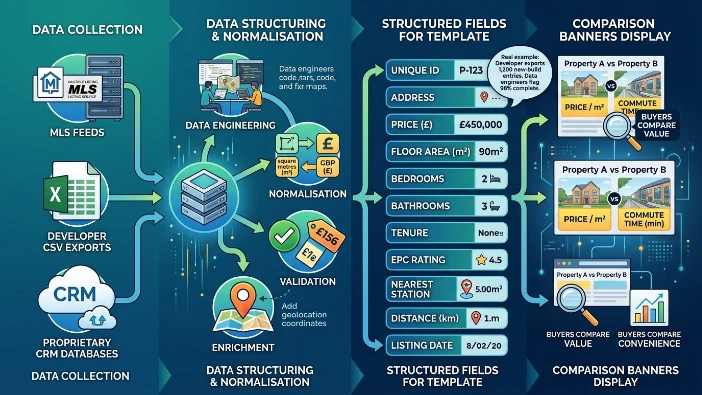
Advertisers normalise units (square metres, GBP), validate prices against current listings, and enrich records with geolocation coordinates. Real example: a developer exports 1,200 new-build units from a CRM; data engineers map those entries to the banner template fields and flag 98% of entries as complete. Consistent data enables side-by-side metrics like price/m² and commute time, which buyers use to compare value and convenience.
How are comparison banners designed for clarity and trust?
Design principles: align attributes in horizontal rows, use 18–24px fonts for key numbers, apply contrasting colours for property highlights, and include a verification badge plus last-updated timestamp. Creative templates restrict copy to 12–18 words per option and limit images to one per property to avoid clutter. Real example: a banner compares two flats with identical rows for price, size, EPC, tenure, and travel time; a green verified icon and “updated 2 days ago” timestamp increase perceived accuracy. Trust elements reduce bounce rate and increase time spent on the landing page.
How do advertisers choose which attributes to compare for UK buyers?
Advertisers select attributes that correlate with UK buyer priorities: price, size, transport links, EPC rating, and tenure. UK buyers prioritise price, size (m²), number of bedrooms, proximity to rail or tube, and energy efficiency. Advertisers include council tax band and freehold/leasehold status when relevant. For commuter buyers, travel time to central London or a major hub appears in minutes; for regional markets, distance to the nearest train station in kilometres is common.
Real example: a banner aimed at Manchester professionals shows commute time to Manchester Piccadilly (15 minutes) and EPC rating B to reflect running cost concerns. Attribute selection aligns the comparison with buyer decision drivers.
How do targeting and placement strategies affect ad performance?
Targeting uses demographic, behavioural, and contextual signals and placements on property portals and publisher sites to reach active buyers. Advertisers target by postcode interest, recent searches for “2-bedroom flat”, income band, and site behaviour such as saved searches. Placement options: high-traffic property portals, local news sites, and commuter-focused publisher pages.
Programmatic channels enable frequency caps and dayparting for peak browsing hours (18:00–22:00 local time). Real example: a campaign targeting South West London uses placements on borough council news pages and commuter blogs, achieving a 24% higher click-through rate versus general display placements.
What measurement metrics show the educational impact of comparison banners?
Key metrics: click-through rate, time on comparison page, shortlist conversions, and assisted conversions in 30 days. CTR indicates initial engagement. Time on page measures whether buyers review comparisons. Shortlist conversions track adding properties to a saved list. Assisted conversions record downstream leads attributed to the banner within a 30-day window. Advertisers run A/B tests comparing single-listing banners to comparison banners to measure lift. Real example: an A/B test in Bristol shows comparison banners produce a 35% higher shortlist conversion and a 22% higher assisted conversion over single-property creatives.
How do advertisers integrate comparison banners with landing pages and tools?
Banners link to structured comparison pages that keep the same attributes and allow filtering and contact actions. Landing pages mirror banner attributes and add sorting, filter controls, maps, and enquiry forms. Pages expose the same unique IDs and timestamps for auditability. They include a persistent comparison bar so users can add or remove properties and view combined metrics like average price/m². Real example: a comparison landing page for a new suburban scheme allows users to compare three plots and shows council tax and local school ratings; the page records that 42% of users used the map filter before contacting an agent.
What legal and compliance considerations apply in the UK?
Advertisers must follow ASA rules, CMA guidance on misleading pricing, and data protection requirements under UK GDPR. All price claims must be accurate and not misleading. Advertisers disclose material facts such as lease length and service charges. Energy labels use official EPC ratings. Data used for targeting must follow UK GDPR: advertisers document lawful basis, provide opt-outs and honour suppression lists. Real example: a banner that listed a price without leasehold service charge was corrected after an ASA complaint; the revised creative added “plus service charge” and a link to full charges.
Explore More Expert Insights:
How Housing Projects Build Consideration Using Visual Display Ads
How Real Estate Agencies Increase Site Visits Using Banner Advertising
What are the main benefits of using property comparison banner ads?
Comparison banners accelerate buyer education, reduce research load, increase qualified leads, and improve campaign efficiency. Buyers get immediate, structured comparisons across measurable attributes. Advertisers see higher engagement and higher-quality enquiries. Campaigns reduce wasted clicks by surfacing comparative value up front, which shortens the buyer funnel from discovery to shortlist. Real example: a developer campaign for a 300-unit scheme reported a 28% decrease in unqualified viewings after deploying comparison banners.
What use cases work best for comparison banners in the UK market?
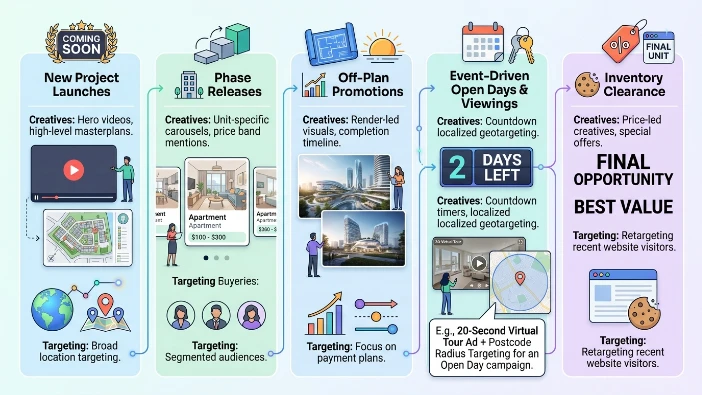
Use cases: new-build launches, off-plan sales, commuter-focused outreach, and cross-county comparison targeting. New-build launches benefit from side-by-side unit comparisons by floor area and price band. Off-plan sales show expected completion dates and reservation terms. Commuter outreach compares travel times to major hubs. Cross-county comparison targets buyers choosing between nearby towns by listing average price/m² and school ratings. Real example: a commuter campaign compared Reading and Slough options and generated leads from buyers relocating from West London.
Explore:
How Real Estate Brands Promote Property Launches Using Banner Ads
Conversion-focused implementations, see:
Property Comparison Ads That Turn Browsers Into Serious Buyers
How Realtors Educate Buyers Using Property Comparison Banner Ads related line for internal adjustment: Property comparison banner ads help buyers quickly evaluate price, size, and commute trade-offs to create better-qualified enquiries.