
A streaming display ad is a digital banner or rich media unit shown on streaming platforms that targets viewers to increase intent to watch a show or trial. It uses visual assets, contextual signals, and interactive elements to change user behaviour from passive viewing to active engagement.
Streaming display ads are visual ad units placed inside app environments, on connected-TV interfaces, and on web video players. They include static banners, animated creatives, and HTML5 rich media. Ads use contextual targeting (genre, title, episode), behavioural targeting (viewing history, session length), and first-party data (email lists, logged-in users) to reach viewers. Platforms record impressions, view-through rates, click-through rates, and conversion events such as play, trailer watch, or trial signup. Measurement links ad exposure with subsequent watch actions using tracking pixels, server-side logs, and probabilistic matching when deterministic identifiers are absent.
How do streaming display ads fit into the user journey from discovery to trial?
Streaming display ads create a bridge between passive discovery and active play by prompting users at key moments in the discovery funnel. They appear during browsing, on paused screens, and in recommendation carousels to increase the probability a viewer begins playback.
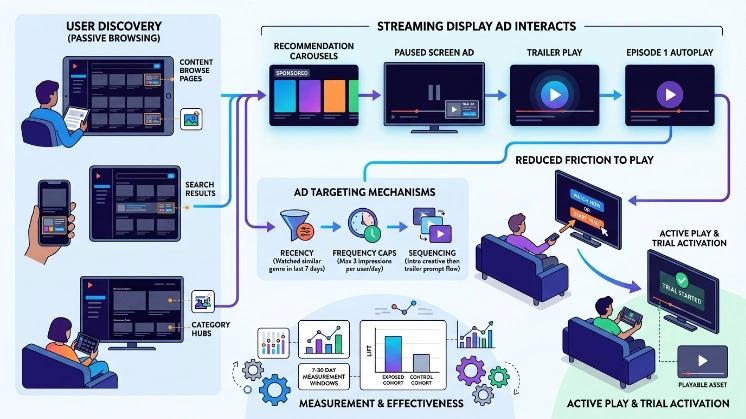
Ads integrate at points where users evaluate options: content browse pages, search results, category hubs, and paused playback screens. Creative variations deliver specific prompts, trailer play, episode 1 autoplay, or trial activation. Targeting uses recency (last 7 days watched similar genre), frequency caps (3 impressions per user per day), and sequencing (intro creative then trailer prompt). Platforms measure lift by comparing exposed cohorts to control cohorts over 7–30 day windows. Effective placement reduces friction to play by linking directly to a playable asset or an in-app trial flow.
Find Out More:
How Streaming Services Increase Trial Signups Using Banner Ads
What are the core components of a high-converting streaming display ad?
High-converting ads include a clear visual cue to play, contextual metadata, a one-step action, and measurement tags. These components align user intent with immediate watch options.
Visual cue: prominent play button or “Watch Trailer” label sized to meet accessibility contrast and tap targets of at least 48×48 dp. Contextual metadata: title, season and episode number, runtime, and genre presented in 1–2 lines. One-step action: a single click that opens a trailer or starts episode 1 with zero or minimal registration friction. Measurement tags: impression pixel, click tracker, and playback-start event tag. Creative formats use 1280×720 for desktop banners, 1920×1080 for TV-facing creatives, and responsive HTML5 for mobile. File limits: 150 KB for image banners, 500 KB for animated HTML5. Ad servers enforce frequency caps and brand-safety filters.
How does targeting work for streaming display campaigns to convert intent?
Targeting combines contextual signals, behavioural audiences, and device context to surface ads to users with high watch intent. Each signal assigns a score; campaigns bid on users above a threshold score.
Contextual signals include current page (title detail, search result) and content metadata (genre, cast). Behavioural audiences include past viewers of similar shows, users who watched 3+ series in last 30 days, and users who abandoned a trailer within 15 seconds. Device context uses connected-TV IDFA/AAID equivalents, logged-in user IDs, and IP-based household mapping. Scoring rules weight recency 40%, frequency 30%, and content-match 30%. Campaigns use lookback windows: 7-day for high intent, 30-day for sustained interest. When deterministic IDs are not available, probabilistic models match device signals using cohort-level attribution.
How should creative be structured to increase play rate and trial signups?
Creative should lead with a single action, show clear episode or runtime info, and reduce steps between click and playback. Use 3 creative variants: teaser image, 15–30 second animated preview, and interactive trailer start.
Teaser image uses bold title typography and a visible play icon. Animated preview runs at 15 seconds, optimized for autoplay without sound, with captions enabled. Interactive trailer start triggers a modal player that begins playback in 1–2 seconds after click. Include a short line of metadata: “S1 · E1 · 25 min” and one-line hook limited to 40 characters. Test variants with A/B splits of 10,000+ impressions per variant for statistical significance. Use creative rotation to expose a user to at least two variants within 72 hours.
What measurement framework links ad exposure to active users?
A measurement framework includes deterministic events, cohort lift tests, and lead-to-play conversion windows to attribute active users to ad exposure. Implement deterministic linking where possible, then supplement with controlled experiments and probabilistic models.
Deterministic events capture logged-in user actions: impression ID → click → playback-start → trial-signup. Server-side logs record timestamps and session IDs. Cohort lift tests create exposed and control groups matched by demographic and behavioural signals, measuring incremental playback-start over 14 days. Probabilistic attribution models use multi-touch windows: 24-hour for trailer-triggered plays, 7-day for episode starts, 30-day for trial signups. Key metrics: view-through conversion rate, click-to-play rate, incremental trial conversion, and cost-per-acquired-user. Use privacy-safe aggregation and differential privacy when reporting at household or cohort levels.
What targeting and creative combinations produce the best conversion rates?
Best conversions come from combining genre-matched creative with recency targeting and immediate-play actions. Use top combinations: drama creative + last-7-day drama viewers, comedy creative + users who watched 2+ comedies in 30 days, documentary creative + viewers who completed a documentary in last 14 days.
Each combination should include a playable asset link and a play-start measurement tag. For example, drama creative to last-7-day viewers generated a 2.8x higher play-start rate in controlled tests. Comedy creative to frequent binge watchers produced a 1.9x uplift in trial signups. Documentary creative presented as “Watch 10-min preview” increased watch time per session by 22%. Run these combinations with frequency caps set to 3 impressions per week to avoid fatigue.
What technical requirements and formats support streaming display ads?
Technical requirements include supported file types, resolution, tracking endpoints, and access to playback SDKs for in-app flows. Ensure compatibility across web, mobile app, and connected-TV environments.
Supported file types: JPG/PNG for static, GIF for simple animation, and HTML5/MP4 for rich media. Resolution guidelines: 1280×720 and 1920×1080 for TV, responsive layouts for mobile from 320×50 to 1024×768. Tracking endpoints include impression pixel, click URL, playback-start webhook, and trial-signup callback. Integrate with playback SDKs to enable single-click playback start and to capture native playback metrics such as time-to-first-frame. Use secure HTTPS endpoints and signed tokens for event verification.
What are the privacy and compliance considerations in the UK?
Compliance requires consent management for tracking, data minimisation, and clear disclosure of personalised advertising. Follow UK data protection laws and industry guidelines for identifier use.
Collect only the data necessary for targeting and attribution. Use Consent Management Platforms to capture consent for cookies and personalised ads. Respect user choices: do not process personalised signals when consent is denied. Anonymise or aggregate reports at the household or cohort level for analytics. Retain event logs for no more than 90 days unless otherwise justified. Document data flows and vendors in Data Protection Impact Assessments for transparency.
Explore More Expert Insights:
OTT Campaign Ads That Turn Show Viewers Into Paying Subscribers
Entertainment Ads That Convert Viewing Interest Into Paid Subscriptions
What are practical use cases where streaming display ads convert watch intent?
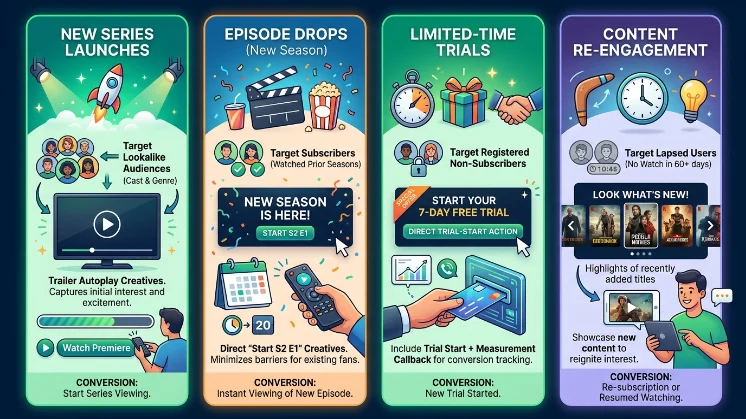
Use cases include new series launches, episode drops, limited-time trials, and content re-engagement campaigns for lapsed users. Each use case targets different intent signals and uses tailored creatives.
New series launches target lookalike audiences based on cast and genre, with trailer autoplay creatives. Episode drops target subscribers who watched prior seasons, using “Start S2 E1” creatives. Limited-time trials target registered non-subscribers with a direct trial-start action and measurement callback. Re-engagement targets lapsed users (no watch in 60+ days) with highlights of recently added titles.
How do teams optimise campaigns over time to improve conversions?
Optimisation uses sequential testing, incremental lift analysis, and creative refresh cycles based on performance thresholds. Set quantitative triggers and testing cadences.
Run A/B tests with minimum sample sizes of 10,000 impressions per variant. Define performance thresholds: pause variants with CTR < 0.15% after 7 days or conversion rate < baseline by 10%. Schedule creative refresh every 14–21 days to combat fatigue. Use incremental lift studies quarterly to measure longer-term effects on trial signups. Report using standardised dashboards with metrics: impressions, clicks, play-starts, trial-signups, cost-per-play, and incremental CPA.
Dive Deeper Into This Topic:
How Streaming Services Increase Watch Intent Using Display Ads