
Banner advertising formats consist of static, animated, and interactive digital ads displayed on websites in standard sizes like 300×250 pixels or 728×90 pixels. They deliver visual messages to drive clicks and views, directly influencing user engagement through visibility and relevance.
Banner advertising formats refer to predefined digital ad units embedded in web pages. These units follow IAB standards, which specify dimensions such as medium rectangle at 300×250 pixels and leaderboard at 728×90 pixels. Developers create them using HTML, CSS, and JavaScript to ensure compatibility across browsers and devices. Static formats display fixed images with text overlays. Animated formats incorporate GIF or HTML5 elements for motion up to 15 seconds. Interactive formats add hover effects or expandable panels that respond to user input.
These formats integrate into page layouts above the fold or within content feeds. Servers deliver them via ad networks that match ads to user demographics and behavior. Formats prioritize load times under 2 seconds to avoid bounce rates exceeding 50%. Engagement metrics track impressions, clicks, and time spent, with formats optimized for mobile screens under 320 pixels wide.
What is the process of creating banner advertising formats?
The process starts with defining objectives, selecting sizes, designing visuals, coding interactions, testing across devices, and launching via ad servers. This sequence ensures formats load quickly and engage users effectively.
Creation begins with objective setting, such as increasing brand recall by 20% or driving 5% click-through rates. Teams select IAB sizes based on placement: 300×250 for sidebars, 970×250 for sticky headers. Designers use tools like Adobe Animate to build assets with 150 KB file limits. Static banners feature high-contrast images at 72 DPI resolution.
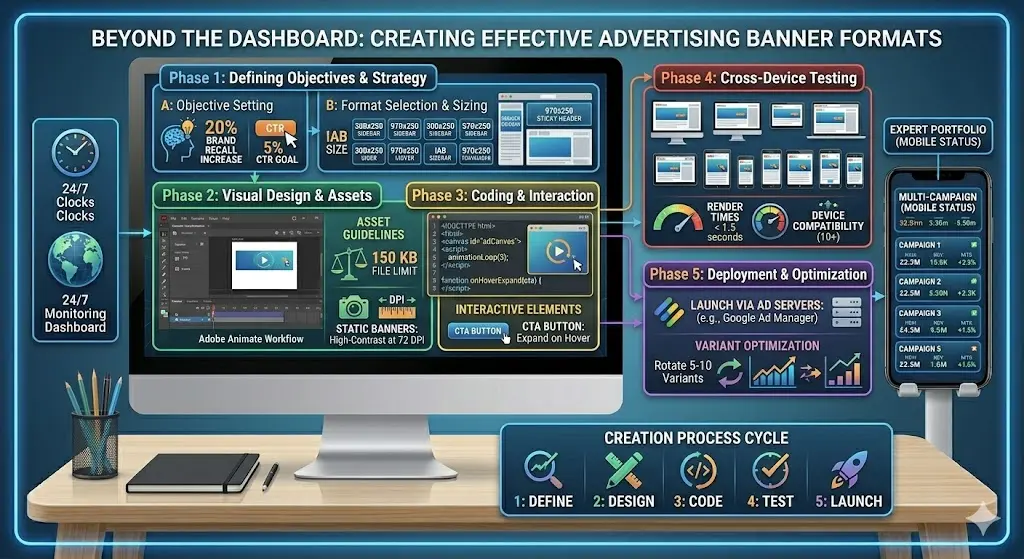
Coding follows with HTML5 canvases for animations looping three times. Interactive elements include call-to-action buttons expanding on hover. Testing occurs on 10+ device-browser combinations, verifying render times under 1.5 seconds. Ad servers like Google Ad Manager then deploy formats, rotating 5-10 variants per campaign to optimize performance.
What are the main components of banner advertising formats?
Main components include creative assets, size specifications, animation scripts, tracking pixels, and backup images. These elements combine to deliver consistent performance and measurable engagement data.
Creative assets form the core, comprising logos, headlines in 24-point fonts, and product images at 100% opacity. Size specifications adhere to 40+ IAB standards, ensuring 100% viewability. Animation scripts use JavaScript libraries like GSAP for smooth transitions under 5 KB.
Tracking pixels, 1×1 invisible GIFs, fire on load and click to log metrics. Backup images serve as fallbacks for unsupported browsers, maintaining 99% delivery rates. Call-to-action elements, such as “Learn More” buttons, occupy 20% of the canvas to boost interaction.
What benefits do banner advertising formats provide for user engagement?
Banner formats increase visibility by 30-50% through strategic placements, boost click-through rates to 0.5-2% with targeted creatives, and enhance recall by 25% via repetition, directly elevating engagement levels.
Strategic placements above the fold capture 70% of user attention within 5 seconds. Targeted creatives matching user interests lift engagement by personalizing messages, achieving 1.5% average CTRs across 1 billion impressions. Repetition across sessions reinforces memory, with studies showing 28% recall uplift after 7 exposures.
Frequency capping at 5 impressions per user prevents fatigue, sustaining engagement over 30-day campaigns. Responsive designs adapt to screen sizes, retaining 90% of mobile traffic. A/B testing of 10 variants identifies top performers, scaling engagement by 40%.
[For deeper insights into professional implementations, read our guide What Should You Expect From Professional Banner Advertising Service Providers Today?
How do different banner advertising formats impact user engagement?
Static formats deliver 0.3% CTRs with fast loads; animated formats raise CTRs to 0.8% via motion; interactive formats achieve 1.2% CTRs through user participation, each influencing dwell time and conversions differently.
Static formats prioritize speed, loading in 0.5 seconds to retain 95% of users. They suit brand awareness, generating 10 million impressions daily with minimal distraction. User engagement focuses on glanceable text, averaging 2-second views.
Animated formats introduce 3-second loops that draw eyes 2.5 times longer than statics. They excel in e-commerce, where product demos increase add-to-cart rates by 15%. Engagement spikes from motion cues, with hover rates doubling.
Interactive formats expand on click, offering quizzes or sliders that hold users 10 seconds. They drive 3x higher engagement in gaming sites, converting 2% of interactions to leads.
What are common sizes used in banner advertising formats?
Common sizes include 300×250 medium rectangle, 728×90 leaderboard, 320×50 mobile banner, 970×90 large leaderboard, and 160×600 skyscraper. These dimensions optimize engagement across desktop and mobile placements.
The 300×250 medium rectangle fits sidebars on 80% of news sites, capturing sidebar scrolls with 0.5% CTRs. It balances visibility and non-intrusiveness, serving 40% of display ad inventory.
The 728×90 leaderboard spans top headers, viewed by 60% of desktop users. It generates high impressions, averaging 1 billion daily across publishers.
Mobile banners at 320×50 suit smartphone feeds, loading in feeds with 90% viewability. Skyscrapers at 160×600 run vertically, engaging sidebar traffic for 8-second averages.
[Explore high-impact applications of these formats Use High Converting Banner Ad Formats Across Premium News Websites Today.
How do static banner formats work and affect engagement?
Static banners display fixed images with text in sizes like 468×60, loading instantly to achieve 0.2-0.4% CTRs. They build familiarity through repetition, sustaining long-term engagement without overwhelming users.
Static banners use JPEG or PNG files optimized to 50 KB, rendering in under 0.3 seconds. Publishers place them in fixed positions, rotating 20 creatives weekly. They target broad audiences, accumulating 500 million impressions monthly.
Engagement derives from clear messaging: headlines under 10 words pair with logos. Users process them subconsciously, leading to 15% unaided recall after 10 exposures. Low animation avoids distractions, ideal for professional sites where focus matters.
How do animated banner formats function and influence engagement?
Animated banners employ HTML5 or GIF sequences looping 3 times in 15 seconds, boosting CTRs to 0.5-1% by attracting attention. They demonstrate products dynamically, increasing interaction by 40%.
HTML5 animations use canvas elements for vector graphics, supporting 60 FPS playback. They transition between 3-5 frames, highlighting benefits like price drops. Ad networks throttle loops to prevent annoyance, capping at 3 cycles.
Engagement rises from visual storytelling: a shoe ad animates laces tying, holding views 4 seconds longer. Data shows 25% higher click intent versus statics, especially in retail with 2% conversion lifts.
What role do interactive banner formats play in user engagement?
Interactive banners feature expandable panels, sliders, or games activated by hover or click, driving 1-3% CTRs. They extend session time to 15 seconds, fostering deeper connections and higher conversions.
Expandable banners grow from 300×250 to 600×500 on interaction, revealing forms or videos. JavaScript handles state changes, ensuring 2-second expansions. They comply with 15% expansion limits per IAB guidelines.
Sliders let users swipe colors or sizes, personalizing experiences. Games like spin-wheels reward entries with discounts, achieving 5% participation rates. Engagement metrics show 50% longer dwell times, converting 3% to email signups.
What use cases demonstrate banner formats’ engagement impact?
Use cases span e-commerce product showcases with 2% CTRs, news site promotions at 0.7%, and app installs yielding 1.5% conversions. Each leverages format strengths for targeted results.
E-commerce employs animated rich media for flash sales, rotating 50 creatives to hit 1 billion impressions. Interactive carousels showcase 10 products, lifting sales 18%.
News sites use leaderboards for event coverage, static formats driving 20% traffic spikes. Mobile banners promote newsletters, gaining 5,000 subscribers daily.
App campaigns feature gamified banners with download buttons, tracking 4 million installs quarterly. Video interstitials within formats boost retention 30%.
How do banner formats optimize for mobile user engagement?
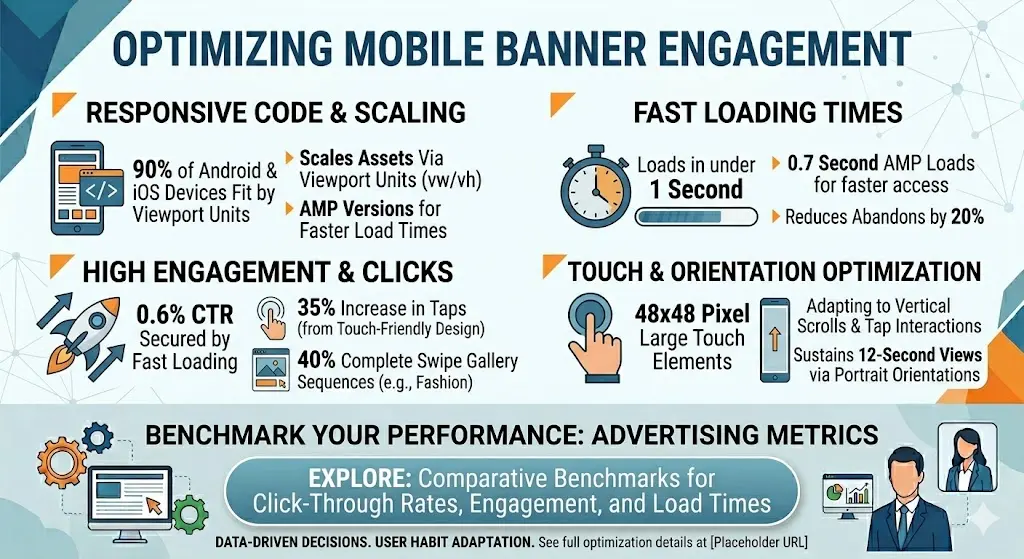
Mobile formats like 320×100 and 300×50 use responsive HTML5, loading in 1 second to secure 0.6% CTRs. Touch-friendly designs increase taps by 35%, adapting to vertical scrolls.
Responsive code scales assets via viewport units, fitting 90% of Android and iOS devices. AMP versions accelerate loads to 0.7 seconds, reducing abandons by 20%. Touch elements enlarge buttons to 48×48 pixels, easing interactions. Swipe galleries engage fashion users, with 40% completing sequences. Portrait orientations match habits, sustaining 12-second views.